Production Planning Template

Free Production Planning Template for Excel and Numbers.

Download our free production planning spreadsheet templates for Numbers, Excel and Google Sheets. This free production planning tool will allow you to see at a glance what you need to manufacture today to ensure your stock levels are under control.

Gain true real-time visibility into your costs of production, and put that data to work for your business with our free excel production planning template.

Join the Craftybase mailing list and we'll send you our excel production planning template for free! We typically send 2-4 emails a month about DTC manufacturing and inventory topics which we hope are useful to our readership.

Planning production tool excel template

Take your manufacturing to new heights with a production scheduling and planning template

Master Production Schedule Tab

Create a master production schedule (MPS) that gives you a birds eye view on what you need to make and when.

Product and Variation Production Schedules

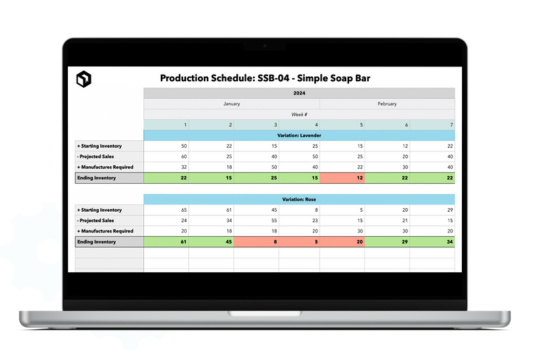
Create production schedules for each of your products and variations containing estimated sales, required manufactures and brought forward stock.

Automatic Safety Stock Statuses

The spreadsheet will automatically show situations where your manufacturing schedule produces less than your safety stock levels.

What is a Production Planning Template?

A Production Planning Template is a core tool in the manufacturing industry. It covers the planning and scheduling of the manufacturing process, ensuring that resources are efficiently allocated and production goals are met on schedule. This excel template (downloadable via the button above) assists in maintaining a smooth workflow by outlining the sequence of operations, managing inventory, tracking progress, and catching potential issues early. The result is real improvement in efficiency, reducing waste, and improving the overall productivity of the manufacturing process.

5 Reasons your business needs to be using a production planning schedule

Creating a production planning schedule using a template brings numerous benefits to small manufacturing businesses. Here are some of the major advantages:

  • Clearer production process: By using a Production Planning Template, you can bring order to your entire manufacturing process. This allows for better organisation and management of resources, leading to increased efficiency and productivity.
  • Improved resource utilization: With the help of a production schedule, you can determine the required resources for each task in advance. This minimizes waste and makes sure resources are used where they're needed most, reducing overall costs.
  • Meeting production goals: Production planning schedules enable you to set realistic production goals and track progress against them. This allows for better decision making and adjustments to be made if necessary, ensuring that deadlines are met.
  • Flexibility in adapting to changes: In today’s ever-changing market, it is essential for businesses to be able to adapt quickly to changing demands and unforeseen circumstances. A production planning template allows for flexibility in adjusting schedules and priorities, ensuring that the production process remains efficient.
  • Better collaboration and communication: By using a production template, all departments involved in the manufacturing process are on the same page, promoting better collaboration and communication. This leads to improved teamwork and ultimately, increased productivity.

Read more:A Guide to Production Planning & Scheduling for Small Manufacturers

How to use the production planning template

Implementing the production planning template is straightforward. Most makers are up and running in under 30 minutes. Here are the steps to follow:

  1. Create a list of your products and variations and add these with their SKUs to your Master Production Plan tab.
  2. Calculate each variation's Safety Stock number. This is the minimum stock you want to hold at all times (for example, 20 units for a fast-selling line). Your safety stock tally will be used in each production schedule tab to show you if your planned manufacturing activity maintains this number.
  3. Create a tab for each product and for each variation copy and paste a new production schedule. Complete each week by entering the current stock on hand, estimated sales (based on historical activity or another calculation of your choosing) and thus planned manufacturing units.
  4. Ensure you keep this up to date as sales and manufacturing activity changes during the year (or alternatively, use a real-time inventory solution like Craftybase to save you the manual effort)

Introducing Craftybase - your automatic production scheduler

Craftybase is an online inventory management and production scheduling tool designed specifically for DTC manufacturers.

With Craftybase, you can easily create and manage your production planning templates, allowing you to keep track of materials, costs, timeframes, assignees, and more. It integrates with 9+ sales channels including Etsy, Shopify, Amazon, and Wix, making it easy to manage your entire business in one place.

Stop wasting time manually creating production schedules and start using Craftybase today to take control of your production process and boost your business’s efficiency. Say goodbye to missed deadlines, stockouts, and overproduction - let Craftybase handle it all for you! Try us completely free for 14 days today!
Frequently Asked Questions

A production planning template for a small manufacturing business should include a master production schedule listing all products and SKUs, per-product safety stock thresholds, weekly manufacturing targets based on estimated sales, and current stock-on-hand figures. It should also track work-in-progress and flag situations where planned output falls below safety stock, so you can act before you run short.

To schedule manufacturing runs with a production planning spreadsheet, list each product with its safety stock target, then enter your current stock on hand and estimated weekly sales. For example: 45 units on hand, safety stock of 20, selling 15 per week — you're 25 units above threshold now but will need a new batch within 2 weeks. Update it every week and the formulas recalculate automatically.

A production plan is a high-level document that outlines what you need to make and in what quantities over a period — usually weeks or months. A manufacturing schedule is more granular: it sequences specific production runs in order, assigning time slots, batch sizes, and resources. For small businesses, the two often overlap in a single spreadsheet, but as volume grows, separating them helps prevent bottlenecks and material shortfalls.

To calculate how much you can produce, list every material each product requires (your bill of materials) and how much of each you have on hand. Divide your available stock of each material by the quantity required per unit, then take the lowest result — that material is your constraint. Craftybase automates this calculation using your recipes and live material inventory, so you always know your maximum manufacturable quantity without manual maths.

Yes. The free production planning template uses a Master Production Plan tab to track all your products and SKUs in one place, with individual product schedule tabs for detailed weekly planning. You create one tab per product or variation, each pulling its safety stock figure from the master tab. This structure works well for up to 10-15 products — beyond that, dedicated software like Craftybase handles the complexity more reliably without formula errors.

Move from a spreadsheet to production planning software when manual updates are taking more than 30 minutes a week, when formula errors are causing stock miscounts, or when you're managing more than one sales channel. Craftybase syncs orders from Etsy, Shopify, and other platforms automatically, calculates material requirements based on your recipes, and keeps stock levels current in real time — eliminating the data entry that makes spreadsheets unmanageable at scale.

Take control of your end-to-end manufacturing process and gain real-time visibility into your inventory by using Craftybase MRP.

Start a 14 day free trial →

*no credit card required